Making My Website's Build 40% Faster Without Touching the Code
❗ Note (2026-01-29): Build times in this post were updated to use Vercel's actual build duration (from
buildingAttoready) rather than total deployment time (fromcreatedtoready). This excludes queue time and matches what Vercel displays in its dashboard. As a result of this fix, the original title "Cutting My Website's Build Time in Half" was changed to "40% Faster" to reflect the corrected numbers. See the updated numbers section below for details.
For the last few weeks, I have been mildly obsessed with reducing this website's build time. It started when Next.js 16 beta was announced, promising faster builds simply by upgrading. That alone was reason enough to try it.
On 2025-10-16, I upgraded from Next.js 15 to the 16 beta. At the time, my average build time was 77 seconds. After the upgrade, without changing anything else, it dropped to 57 seconds. That was the point where curiosity turned into a small experiment: how far could I push this without meaningfully changing the website itself?
What we are working with
This is a personal website, but it has always been intentionally boring in the best possible way. From a content and feature perspective, it has stayed largely the same since its inception. New content was added, but there were no major architectural changes. That makes it a good candidate for isolating the impact of external factors like framework versions, tooling, and infrastructure.
The first build happened on 2023-12-04. The goal back then was to learn Next.js, modern web tooling, and Vercel by building something real instead of another throwaway demo. From day one, the guiding principle was to keep everything as static as possible and optimize for fast delivery.
Grouping patch and minor versions together, the average build times over the years looked like this:
| Period | Avg Build Time | Deployments |
|---|---|---|
| Next.js 14.0.3 | 61s | 154 |
| Next.js 14.1.1 | 74s | 32 |
| Next.js 14.2.0 | 56s | 165 |
| Next.js 15.0.0 | 77s | 187 |
| Next.js 15.1.1 | 77s | 404 |
Upgrading to Next.js 16
Upgrading to Next.js 16 beta on 2025-10-16 immediately dropped the average build time from 77 seconds to 57 seconds.
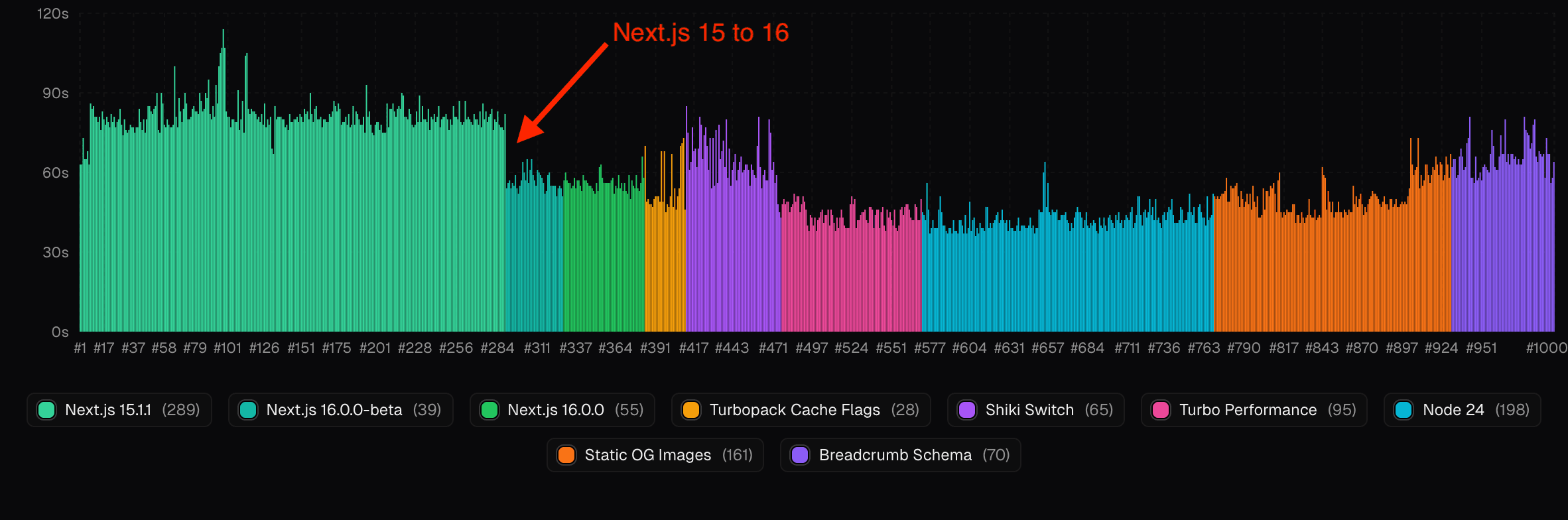
A few days later, on 2025-10-22, I upgraded again to the stable release. That shaved off another second, bringing the average down to 56 seconds. Not a dramatic change, but still a free win.
Turbopack cache flags
Next.js 16 also shipped a stable Turbopack and introduced file system caching in beta. Along with it came two cache flags, one for development and one for builds.
The build cache flag was not widely advertised, mainly because it was still considered experimental. I enabled it anyway. This is a personal site, and a failed build would not affect production. Worst case, Vercel would simply not deploy, or I would roll back instantly.
Those two flags shaved off another two seconds, bringing the average build time down to 54 seconds.
const nextConfig = {
    // Turbopack optimizations
    experimental: {
        // Enable filesystem caching for next build
        turbopackFileSystemCacheForBuild: true,
        // Enable filesystem caching for next dev
        turbopackFileSystemCacheForDev: true,
    },
};
The Shiki switch
Some blog posts include code snippets, and for a long time I used a React-based syntax highlighter. That meant shipping a fair amount of JavaScript to the client, which negatively affected Core Web Vitals for some users.
I eventually switched to Shiki and moved syntax highlighting entirely to build time, shipping static HTML instead. From a UX perspective, this was the right decision. From a build-time perspective, it was not.
The average build time jumped to 65 seconds. That was disappointing, but it also reframed the problem. I had consciously traded build performance for runtime performance. Now the challenge was to claw back build time elsewhere.
Turbo performance build machines
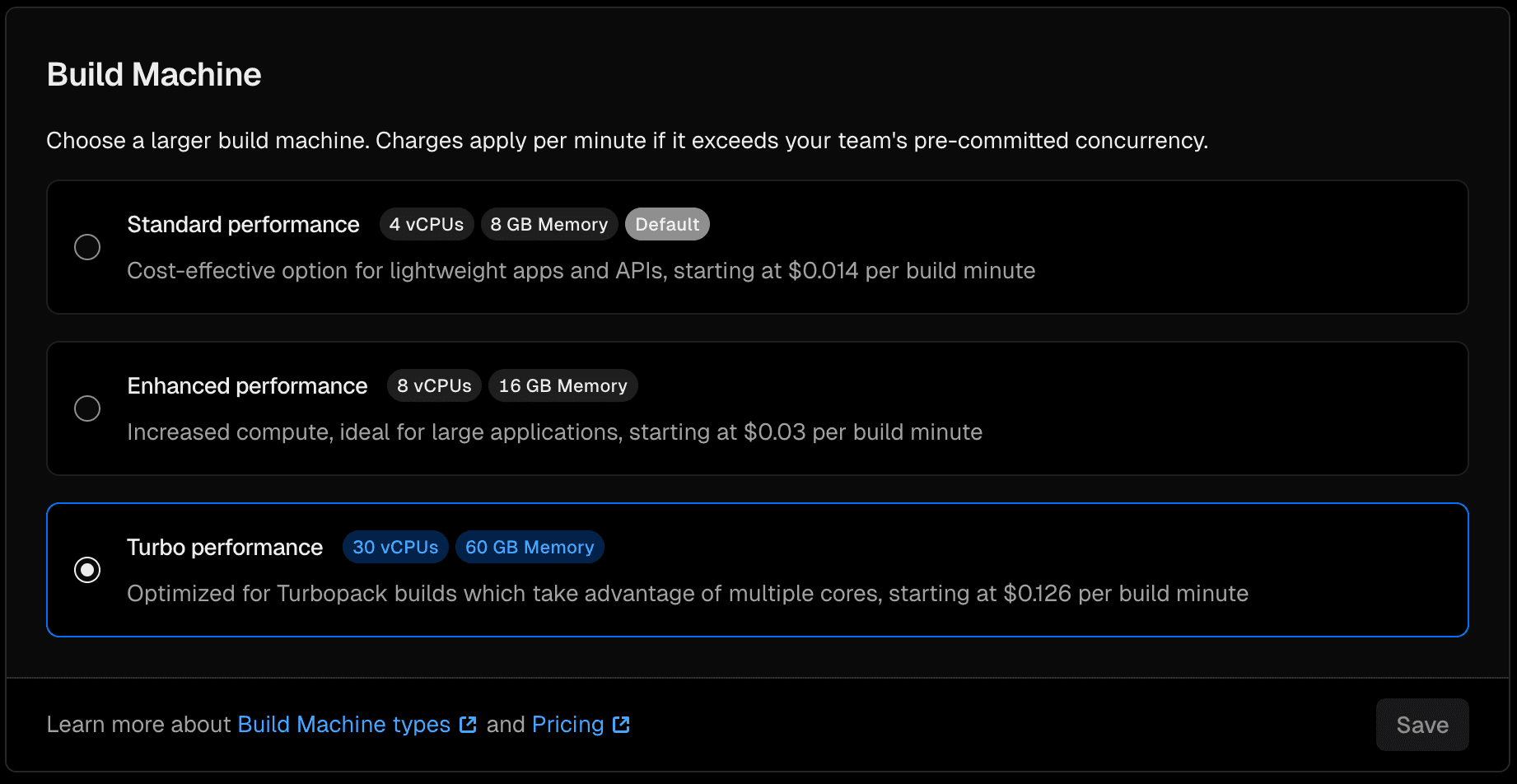
Vercel offers different build machine configurations. For a long time, I used the default machines with 4 vCPUs and 8 GB of memory, more than enough for a personal project.
Around the same time as the Next.js 16 release, Vercel introduced Turbo performance build machines. Switching to them was literally a radio button toggle.
That single change dropped my average build time to 44 seconds.
Node 24
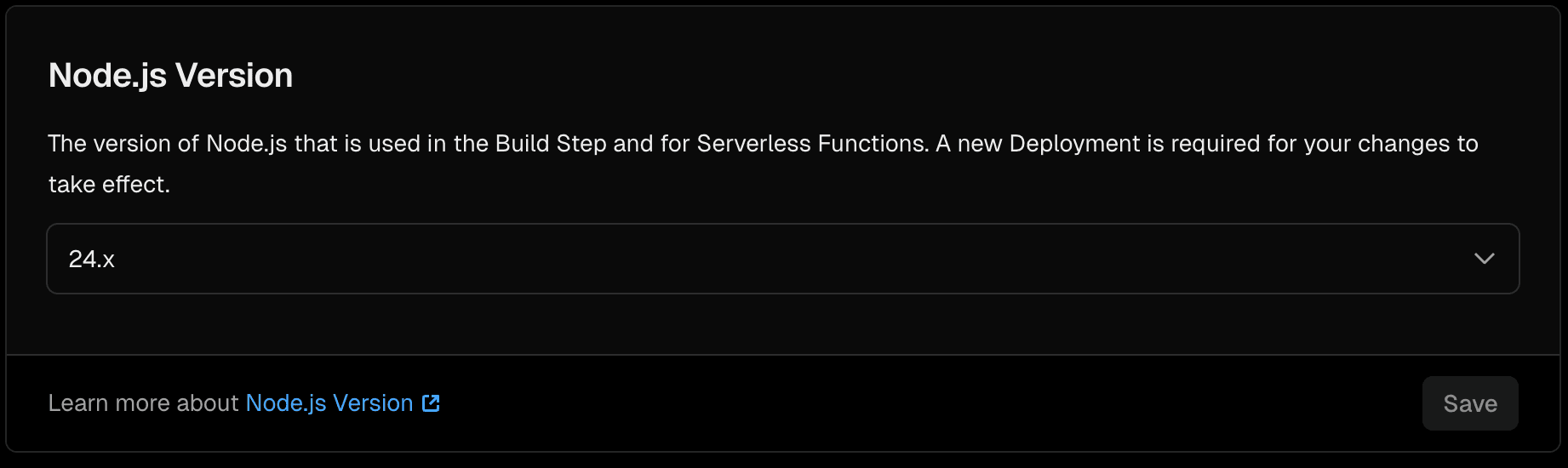
A few days later, Node 24 entered LTS. As outlined in my guiding principles post, I strongly prefer staying close to the latest stable versions for performance, security, and to avoid unnecessary technical debt.
After upgrading to Node 24, the average build time dropped by another second. That finally landed me at 43 seconds.
Static OG images
On 2026-01-14, I made a change to how Open Graph images are generated. Instead of generating them on-demand at runtime, I moved to static generation at build time. This improved runtime performance and edge caching but added some build time overhead.
The average build time increased to 51 seconds. This was an expected trade-off: slightly slower builds in exchange for faster and more reliable OG image delivery.
Breadcrumb schema
On 2026-01-18, I added structured data (JSON-LD breadcrumb schema) across the site to improve SEO and search result appearance. This change added more processing during the build.
The average build time increased to 66 seconds. While this seems like a regression, it was a deliberate choice to add functionality that benefits SEO without impacting runtime performance.
Updated numbers (2026-01-29)
While building a deployment dashboard to visualize build times, I discovered the calculations were using the wrong timestamps. The dashboard was calculating build time as ready - created (total deployment time including queue), but Vercel's dashboard uses ready - buildingAt (actual build duration excluding queue time).
This affected the earlier milestones more significantly because queue times were higher back then. Here is the before and after:
| Period | Old (with queue) | New (actual build) | Difference |
|---|---|---|---|
| Next.js 14.0.3 | 90s | 61s | -29s |
| Next.js 14.1.1 | 116s | 74s | -42s |
| Next.js 14.2.0 | 57s | 56s | -1s |
| Next.js 15.0.0 | 84s | 77s | -7s |
| Next.js 15.1.1 | 82s | 77s | -5s |
The more recent milestones show minimal differences because queue times have been negligible. The fix aligns the dashboard numbers with what Vercel actually displays, making the data more accurate and useful.
Summary
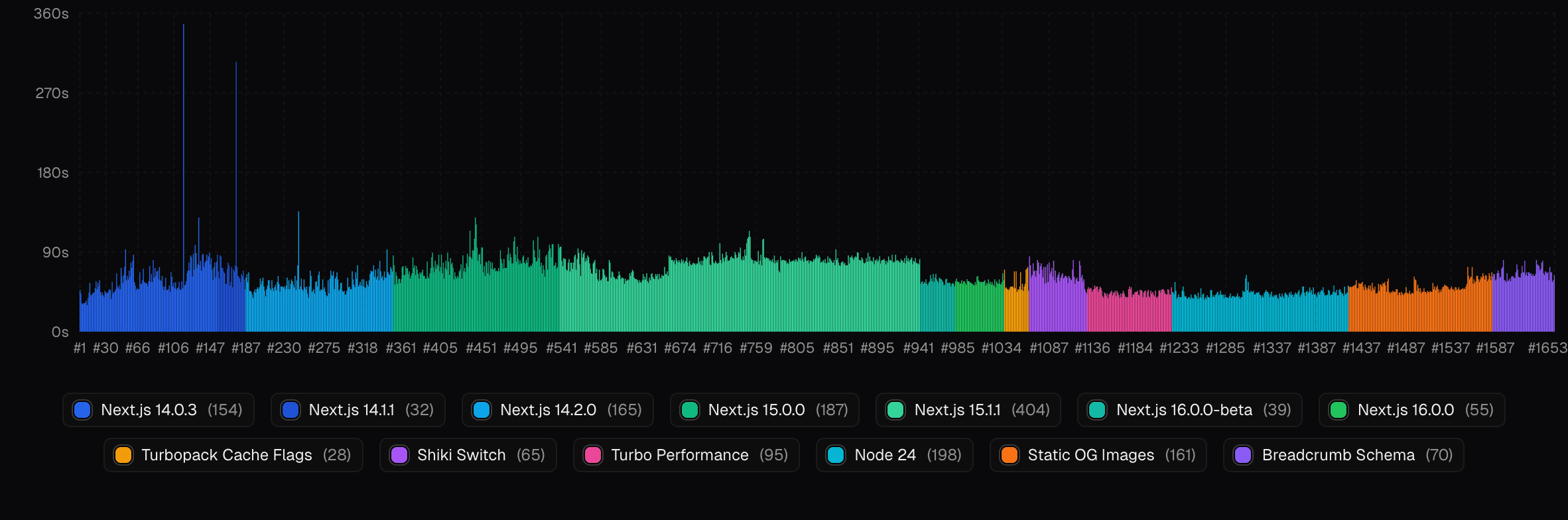
At the time of writing, this site has seen 1653 successful builds. Most of them are dependency updates created automatically by Dependabot, validated by unit and E2E tests, preview deployed on Vercel, and then promoted to production.
Every build includes unit tests and a blog validation script, which together take about two seconds. The numbers in this post refer to the full Vercel build process, not just pnpm build. That includes tests, validation, the build itself, postbuild steps, and deployment until the site is live.
Here is the full picture:
| Period | Avg Build Time | Deployments |
|---|---|---|
| Next.js 14.0.3 | 61s | 154 |
| Next.js 14.1.1 | 74s | 32 |
| Next.js 14.2.0 | 56s | 165 |
| Next.js 15.0.0 | 77s | 187 |
| Next.js 15.1.1 | 77s | 404 |
| Next.js 16.0.0 beta | 57s | 39 |
| Next.js 16.0.0 | 56s | 55 |
| Turbopack cache flags | 54s | 28 |
| Shiki switch | 65s | 65 |
| Turbo performance | 44s | 95 |
| Node 24 | 43s | 198 |
| Static OG Images | 51s | 161 |
| Breadcrumb Schema | 66s | 70 |
| Overall average | 62s | 1653 |
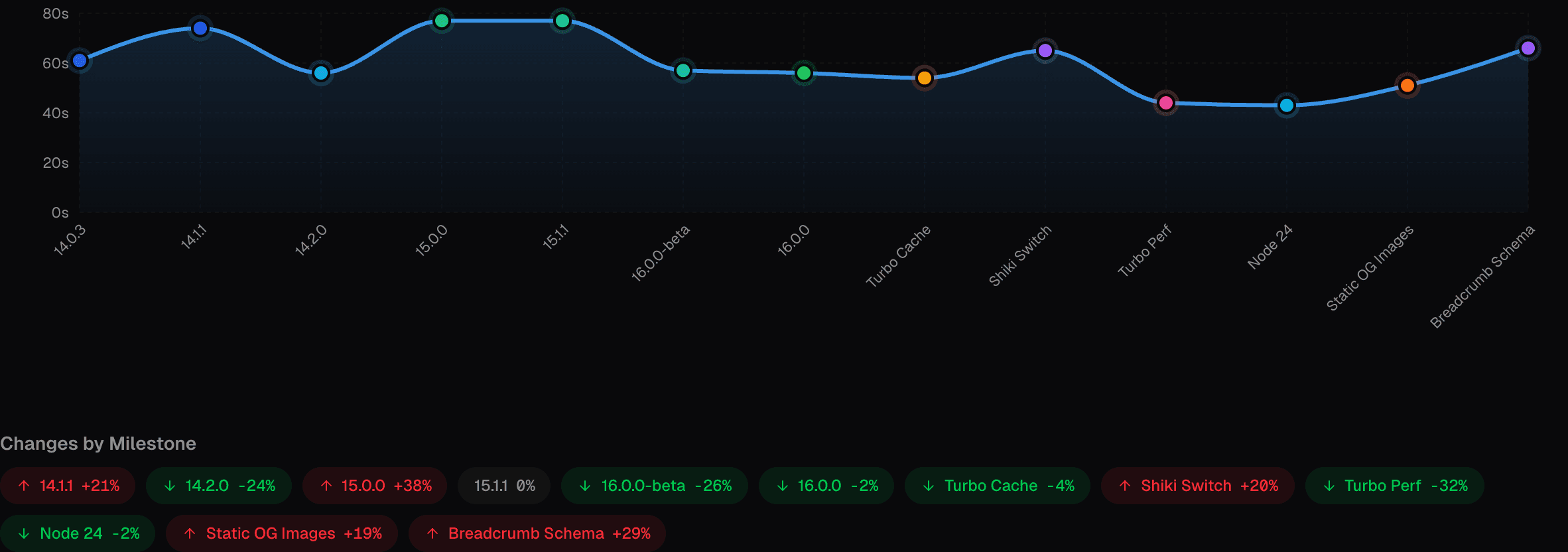
Closing thoughts
Almost all meaningful build time improvements came from upgrading software and using faster hardware, not from changing application code.
Framework and runtime upgrades (Next.js 16, Node 24) were free and shaved off significant time. Switching to faster build machines cost money but paid for itself quickly. If build times matter, developer productivity matters, and iteration speed matters, then slow machines are a tax you pay every single day. Better hardware is often the cheapest solution in the long run.
The optimizations in this post cut build time from 77 seconds to 43 seconds. The compounding effect over hundreds or thousands of builds is anything but small.